Showing posts with label google. Show all posts
Showing posts with label google. Show all posts
What's New In Google?
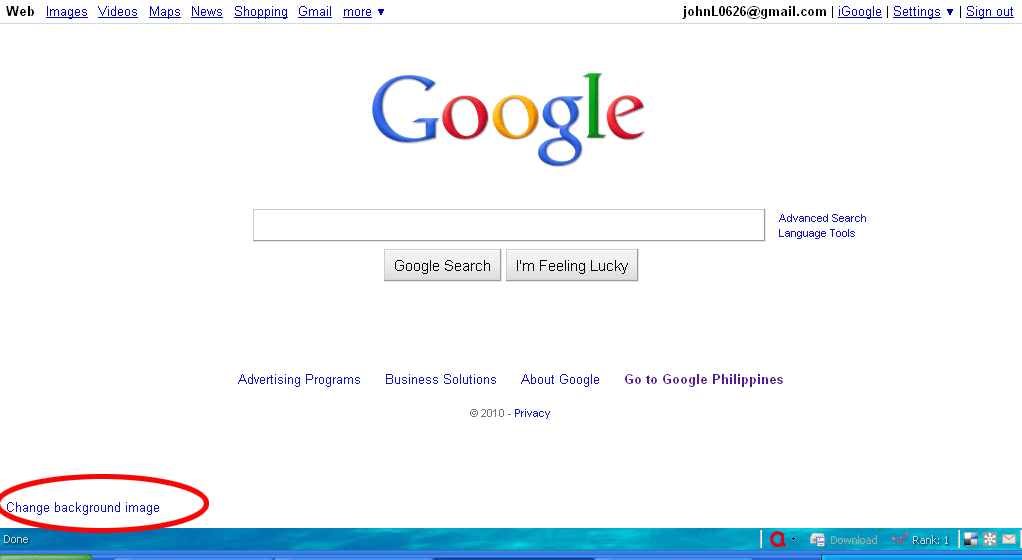
Have you noticed what's new with Google? Go ahead, open http://www.google.com then take a good look. Have you noticed it yet? Take a look at the bottom left of the screen... OK! OK! here's the pic where you're suppose to look.
 Next: How to Change The Background in Google:


Bring Back Pac-Man
Ok, my last two post was all about Google Pacman. For those who was not able to go online for quite some time, Google, to celebrate Pac-man's 30th anniversary, released another one of their Google Oodles and changed their logo into a playable Pac-man game.

Now that Google is back to normal, may some or most of you are wondering (specially those certified pac-man lovers) if there's a way to bring back the pac-man. Yes, there is!
How? Just like any Easter eggs, all you need is to know the 'Magic Words', and to bring back Mr. and Mrs. Pac-man back, type "Google Pac-man" (without the " ") and click the "I'm feeling Lucky" button.
Have fun!

Now that Google is back to normal, may some or most of you are wondering (specially those certified pac-man lovers) if there's a way to bring back the pac-man. Yes, there is!
How? Just like any Easter eggs, all you need is to know the 'Magic Words', and to bring back Mr. and Mrs. Pac-man back, type "Google Pac-man" (without the " ") and click the "I'm feeling Lucky" button.
Have fun!
Insert Coin For Two Player!
Well, Google overdid itself this time, yesterday I posted about Google's Pac-man game (the maze even spells Google). Just this morning I discovered that it is a two player game.
Here's how to make it two player:
Here's how to make it two player:
- Start a new game.
- While in the game, click the "Insert Coin" button.
- Ms (or Mrs.) Pac-man will come out and she can be controlled using the WASD keys.
Easter Eggs I - Google
Easter eggs or virtual Easter eggs in computers are hidden features or codes - I'm might add some jokes- which can be triggered by a series of keys or "a magic word or phrase". Google have "planted" quite a number of Easter eggs in the search engine. Here are some of the "magic words" and description to bring out the bunny!
First off all open your browser and go to http://www.google.com. Then try these one by one and see what happens. (Best of you click the back button before you try the next one.).
First off all open your browser and go to http://www.google.com. Then try these one by one and see what happens. (Best of you click the back button before you try the next one.).
Subscribe to:
Posts (Atom)